// data-verified

Best Digital Angle Finders of 2026

The scale stamped into a miter saw is a suggestion, not a promise. You set it to 45 degrees, cut four pieces, and the last corner still shows a sliver of daylight. A digital angle finder replaces that guesswork with a number you can trust, whether you're tilting a blade to a specific setting or measuring the angle already sitting on the wall, the fence, or the half-built cabinet in front of you.

These tools come in two shapes, and picking the wrong one is the mistake I see most often. A magnetic box sits flat on a saw table or blade to set angles; a hinged ruler opens like a bevel gauge to capture an existing angle, then locks. Over four months, my team ran 14 of them through real cuts, watching for accuracy first, but also how legible the display stays in a dim garage and how fast each one nods off and loses its place.

Worth knowing before you buy: a screen that reads to 0.1 degrees is not the same as a tool that's accurate to 0.1 degrees, and the little bubble vial on the side often tells you more about whether the box is sitting flat than the numbers do. What follows covers both formats and a spread of sizes, so there's a fit for how you actually work.

#01

Best Overall

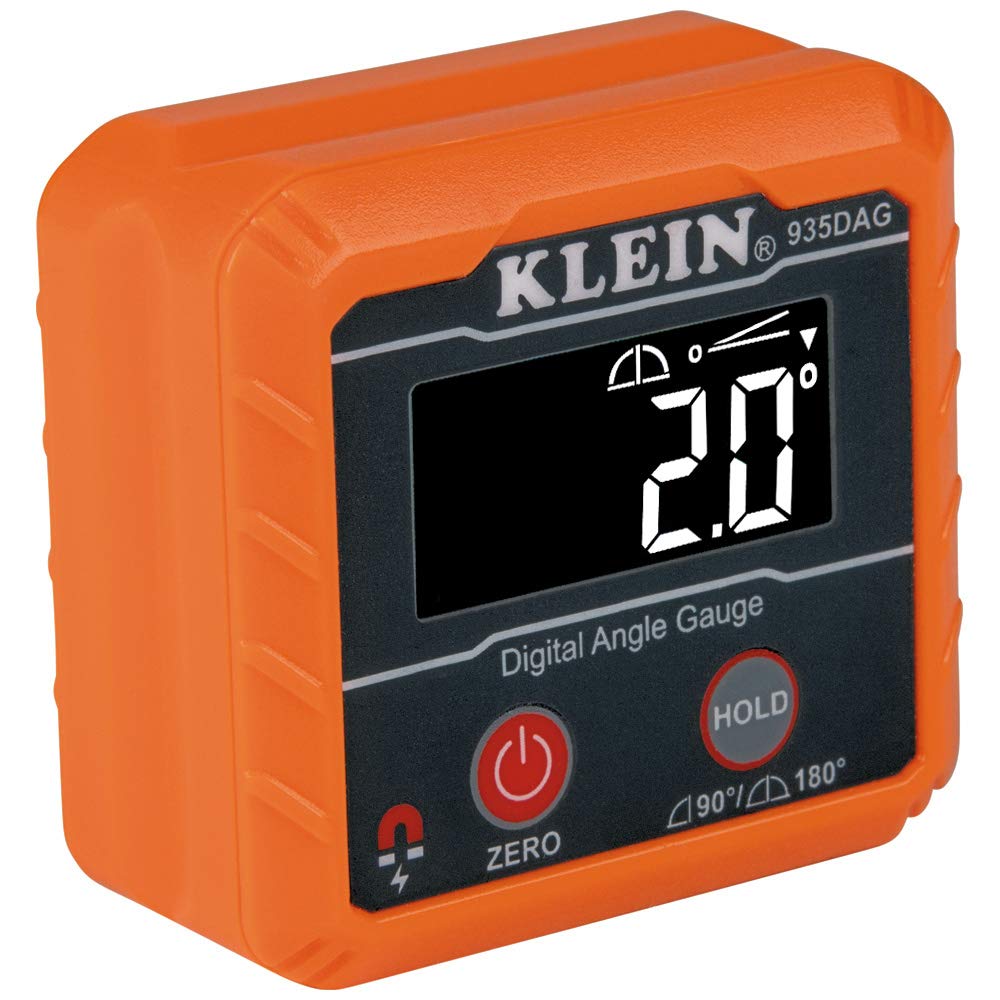
Klein Tools 935DAG Angle Gauge

96 /100
Kirk Score Outstanding
Base
Magnetic, V-groove edges
Range
0 to 90 and 0 to 180 degrees
Weight
3.5 oz
Display
Reverse contrast, auto-rotating
Check Details on Amazon

Pros

  • V-groove base grips conduit and pipe
  • Zero function measures against the saw table
  • Reverse-contrast display rotates for upside-down reading
  • Magnets hold it hands-free on steel

Cons

  • No dual-axis bullseye or pitch presets

Conduit is where a flat-backed gauge gives up: the body rocks on the curve, the number hunts, and you end up holding the tool with one hand while the bender waits. Klein cut V-grooves into the base of the 935DAG so it seats on pipe and conduit the way it seats on a saw table, with the magnets holding it there while you work. That is why it is our pick for the widest range of jobs here - it sets a miter saw blade in the morning and reads a bend in the afternoon.

The display is the part we were not expecting to care about. It is reverse contrast, which is the difference between squinting and not when you are working under a cabinet or in a garage at dusk, and it rotates itself when you turn the tool upside down, so the numbers stay upright while you read a blade from below.

Zero calibration is what turns it into a setup tool. Set it on the saw table, press zero, and the blade is measured against the table rather than against gravity - which is the measurement the cut actually depends on. The 0-180 mode covers the springback arithmetic when you are bending pipe, and that wider range is also what makes the tool useful on a slope or a drainage run.

At 3.5 ounces it feels like a tool rather than a toy, and the case, batteries and manual come in the box. Build the habit of zeroing against a square before a finish cut; it costs ten seconds and catches anything the gauge picked up riding in a bag.

Bottom line: We recommend it as the default because the V-groove base, zero function and rotating display cover saw setup, pipe and layout in one pocket-sized gauge.

Check Latest Price
#02

Best for Saw Blade Setup

Wixey WR300 Digital Angle Gauge

95 /100
Kirk Score Outstanding
Power
1 AA battery
Display
Backlit LCD
Accuracy
+/-0.2 degree
Resolution
0.1 degree
Check Details on Amazon

Pros

  • Tightest stated accuracy in this set
  • Backlit screen readable in a dim shop
  • Auto shut-off protects the AA cell

Cons

  • No V-groove for pipe or conduit

Wixey publishes the tightest accuracy figure in this group: plus or minus 0.2 degrees, with readings to a tenth. That is a number you can plan a joint around, and it is on the box before you buy rather than something you discover on the first test cut.

The rest of the tool is built around that job. The magnetic base clamps to a blade, a fence or a cast-iron top; the LCD is backlit for a garage with one bulb in it; and it shuts itself off so the AA cell is still alive a month later. Zero calibration works the way it should - reference it to the table, then read the blade.

Where it earns its place in our kit is repeatability. Once you have found the angle for a cut, the zero-and-read routine gets you back to it on the next piece without re-deriving anything, and a blade that has drifted shows up before the cut rather than after it. For a shop cutting the same joints week in and week out, that is worth more than a longer feature list.

It is a box gauge, and that is the whole story. There is no groove for round stock and no arms, so corners and conduit are somebody else's job. Within blade setup, we have not found the gap.

Bottom line: If your work is nearly all blade setup, we think the Wixey's published +/-0.2-degree accuracy and clear backlit screen justify the step up.

Check Latest Price
#03

Best Budget

Trend DLB Digital Level Box

95 /100
Kirk Score Outstanding
Weight
6 oz
Display
Backlit LCD, auto-orienting
Zero Function
Yes, sets a relative reference
Adjustment Aid
On-screen arrow indicators
Check Details on Amazon

Pros

  • Zero function sets a reference on any surface
  • Backlit display auto-orients for viewing
  • Comes with a protective case

Cons

  • Heaviest of the box gauges here

The cheapest magnetic box gauge here still does the two things that matter at the saw: it zeroes to any surface you lay it on, and its backlit screen turns itself upright when you tip the tool. Setting a 45 on the miter or checking that a fence is square to the table takes less time than finding the manual.

We kept reaching for it on small jobs, which is the highest compliment a budget tool gets. The screen shows arrows telling you which way to move the blade, so you are not guessing at the direction of the last half degree, and the magnet holds the box against a tilted blade while you turn the adjuster with both hands.

What you give up is documentation and a little refinement. Trend does not publish an accuracy figure for the DLB, and the housing is plastic rather than metal. None of that showed up in the readings we took at the saw, but if you want a number on the box to hold the manufacturer to, this is not the one.

Bottom line: We point budget shoppers here: it zeroes, it reads in the dark, and it costs little enough to live in the saw's drawer without being guarded.

Check Latest Price
#04

Best for Measuring Corners

General Tools 822 Angle Finder

93 /100
Kirk Score Outstanding
Range
360 degrees
Weight
3.2 oz
Functions
Reverse angle, lock, center notch
Ruler Length
5 inches (130 mm)
Check Details on Amazon

Pros

  • Reads inside and outside angles directly
  • Reverse angle function skips the arithmetic
  • Doubles as a 5-inch stainless rule
  • Lock holds a reading in transit

Cons

  • Battery not included

A corner is not a blade, and no cube measures one cleanly. The General 822 is two stainless arms on a hinge with a digital head between them: lay it into the angle, lock it, read the number. Five inches of arm reaches into a cabinet corner, along a stair stringer or across the miters on a length of crown, and it reads inside and outside angles without you doing the subtraction in your head.

Of the arm tools here, this is the one we hand to somebody who measures more than they machine. The reverse angle function means the head can show the angle you actually want rather than its supplement, the lock holds a reading while you carry the tool back to the saw, and the center notch lets you mark the cut on the same rule you measured with.

It is a rule as well as a protractor - 5 inches, marked in 32nds and millimeters - so the tool that found the angle is also the tool that transfers it to the board. At 3.2 ounces it disappears into a tool belt.

The display runs on a timer rather than a switch, so on a long layout session you will wake it up more than once. That is the price of never leaving it on in a toolbox overnight, and it is a fair trade.

Bottom line: Buy it if you measure corners more often than you set blades - no box gauge reaches into a cabinet the way these stainless arms do.

Check Latest Price
#05

Best for Pipe and Pitch

Klein Tools 935DAGL Angle Gauge

93 /100
Kirk Score Outstanding
Alert
Audible alarm, color-changing LCD
Ranges
0 to 90, 0 to 180 degrees, dual-axis bullseye
Weight
5.92 oz
Pitch Presets
1/8, 1/4, 3/8 and 1/2 inch per foot
Check Details on Amazon

Pros

  • Pitch presets in inches per foot
  • Dual-axis bullseye for pipe alignment
  • Alarm and color change at the target angle
  • Same V-groove base and magnet hold

Cons

  • Bulkier and heavier than the 935DAG

Pitch is the number a lot of trades actually work in, and the 935DAGL is the only gauge here that speaks it: 1/8, 1/4, 3/8 and 1/2 inch per foot set as a target, with an audible alarm and a screen that changes color as you close in.

The dual-axis bullseye is the other half of that. Laid on a pipe, it shows X and Y at once, so you can level a run without rolling the tool over to check the second plane - which is the step where a single-axis gauge makes you start again.

Everything the 935DAG does, this one does too: the 0-90 and 0-180 ranges, the auto-rotating display, the magnets and V-grooves, the soft case with batteries. The difference is the head, which is bigger and busier, and a screen that is doing two jobs at once.

It is more gauge than a hobbyist setting a miter saw needs, and at 5.92 ounces it is the heaviest of the Klein gauges here. For pipe, posts and drainage - anywhere the same pitch repeats all day - the extra outlay buys a tool that answers while both hands are busy, and that is what earns it a place next to the cheaper gauge rather than instead of it.

Bottom line: We recommend it for pipe, posts and drainage, where the pitch presets and dual-axis display do work the simpler gauges simply cannot.

Check Latest Price
#06

Trim and crown

Stead & Fast 7-Inch Angle Finder

90 /100
Kirk Score Outstanding
Length
7 inches (200 mm)
Accuracy
+/-0.3 degree
Functions
Zero, hold, degree or degree/minute
Resolution
0.05 degree
Check Details on Amazon

Pros

  • Hold button stores a reading out of position
  • Degrees or degrees and minutes
  • Etched stainless scales stay legible

Cons

  • Lock knob can nudge the arm as it tightens

The hold button is the reason to look at this one. Reading an angle overhead, or in a corner where your head will not fit, you press hold, pull the tool out, and read the number at eye level instead of squinting at it upside down.

It is a 200 mm stainless rule with a digital head at the pivot: inside angles, outside angles and a scale along each leg for marking the cut. Zero sets a reference on the fly, and the display switches between decimal degrees and degrees and minutes, which helps when a drawing is written the old way.

Stated accuracy is plus or minus 0.3 degrees with resolution to 0.05, and the scales are etched into the steel rather than printed on it. It ships with its cell fitted, which is not universal in this group.

Trim work is where we send it: crown, handrail, the odd cabinet corner where a square tells you the wall is not 90 and nothing tells you what it is. On a job like that, the arm span and the hold button save more time than an extra digit of resolution ever will.

Bottom line: Our pick for trim work: the hold button and the degree/minute readout make short work of crown and handrail angles.

Check Latest Price
#07

Long spans

Neoteck 16-Inch Angle Finder

90 /100
Kirk Score Outstanding
Range
0 to 225 degrees
Length
16 inches
Levels
Horizontal and vertical vials
Accuracy
+/-0.5 degree
Check Details on Amazon

Pros

  • Sixteen-inch arms span wide openings
  • Covers reflex angles up to 225 degrees
  • Backlit display and padded case

Cons

  • Locking knob struggles to hold a set angle
  • At 1.19 pounds, awkward to hold one-handed

Read the fine print on this one: the vials are spirit levels, not a digital level reading. The screen gives you the angle between the arms and nothing about horizontal - Neoteck says so plainly, and that is the right way to think about the tool.

What 16 inches of arm buys you is span. Laid across a stair opening, a deck frame or a wide corner, the long legs hold a line that a 5-inch protractor cannot, and the 0-225 degree range covers the reflex angles you meet when you are working around an outside corner rather than into an inside one.

We treat it as the specialist in this group: the tool that comes out for one awkward measurement a month and then hangs on the wall in its padded case. The backlit screen is genuinely useful in a dim basement, the AAA cell is easy to find, and the price sits with the mid-range rather than the premium end.

Plus or minus half a degree is the stated accuracy, which is right for trim, framing and deck work and not what you want for machine setup. Set expectations there and the extra reach is worth the compromise.

Bottom line: Worth owning for the long spans nothing else here reaches, as long as you accept a protractor rather than a digital level.

Check Latest Price
#08

Hanging and layout

XUNTOP Laser Angle Finder

90 /100
Kirk Score Outstanding
Laser
Dual, Class 2 (under 1 mW)
Power
USB-C rechargeable
Magnets
Four sides
Water Resistance
IP54
Check Details on Amazon

Pros

  • Dual lasers mark a horizontal line
  • Magnets on all four sides
  • USB-C rechargeable with IP54 rating

Cons

  • Laser lines soften at a distance

Two laser lines and a level in a 2.4-inch cube: the XUNTOP is a layout tool that also reads angles, and for hanging shelves, setting a cabinet run or getting a row of frames on one line, that is the more useful half. We judged it on that basis, and on that basis it earns a place here.

The magnets are on all four faces, so the cube sticks to a saw blade, a steel stud or the side of a level instead of sliding off the moment you let go. It charges over USB-C rather than eating coin cells, and the IP54 rating means sawdust and a damp garage are not a problem.

The screen is backlit and holds up in a sunny garage, the belt bag keeps the tool on you rather than in a drawer, and the whole thing is small enough to forget you are carrying it. It is the pick here for someone whose angle work is mostly installation rather than machining.

Bottom line: We like it as a hanging and layout tool first and an angle finder second, and it is good at both.

Check Latest Price

How We Tested the Best Digital Angle Finders

We started by pulling together every digital angle finder we could find, then cut the list down by format, size, and price so we had both magnetic box gauges and hinged ruler-style finders represented. Listings that never stated an accuracy tolerance, skipped a zero or reference function, or showed a display too small to read at arm's length got dropped before anything was ordered. That left 14 units, which we used for four months.

Every one of them lived in the shop rather than on a bench: zeroed on a known-flat cast-iron table saw top, taped to a miter saw blade to set a bevel, and laid against the corner of a half-built bookshelf to read an angle that already existed. To check accuracy, we compared readings against a machinist square and a 45-degree drafting triangle, then tilted each unit to a set angle and back ten times to see whether the number returned to the same value. For the ruler-style finders, we opened and closed the legs hundreds of times and re-checked 90 degrees to catch any slop in the hinge.

Readability got judged at a glance, in a dim garage and in direct sun, and we noted whether the backlight washed out the digits or helped. We timed how quickly each unit settles on a number when you tilt it, whether the locking knob or hold button kept the reading after the tool was moved, and how long each one stays awake before auto shut-off kicks in — then logged battery life over weeks of daily use, including the rechargeable model. At the end, we weighed each unit's price against how precise and how pleasant it was to use, because an angle finder that's awkward to switch on is one you stop reaching for.

How to Choose a Digital Angle Finder

Start With the Shape, Not the Spec Sheet

Two families do different jobs, and no single gauge covers both well. A magnetic box gauge - the Klein, the Wixey, the Trend - sits on a blade, a fence or a pipe and tells you how far that surface is from level or from a zeroed reference. A two-arm protractor measures the angle that already exists between two surfaces, which is what you need for a corner, a stair or a handrail.

Most woodworkers end up with one of each. Buy the box first if you are setting up machines, because it is the tool that gets used weekly. Buy the arms first if you are fitting trim into an old house, where the question is what the wall actually is rather than what the saw should be.

What Accuracy and Resolution Really Buy

Resolution is the last digit; accuracy is how close that digit is to the truth. A gauge that reads to 0.1 degree but is only good to half a degree is quoting precision it does not have. The Wixey's +/-0.2 degrees with 0.1 resolution is honest about both ends, and the arm protractors here generally settle around +/-0.3.

For saw setup and joinery, +/-0.2 to +/-0.3 is plenty. The saw's own stops and your technique will introduce more error than that. What matters more is repeatability: a gauge that returns the same number on the same surface lets you creep up on a cut. Check that before you chase a finer digit.

Magnets, Grooves, and Holding the Tool

The magnet is not a convenience, it is what makes a one-person setup possible: stick the gauge to the blade, keep both hands on the adjuster, watch the number move. Two things to check before you count on it. Magnets only hold on ferrous metal, so a cast-aluminium table or a stainless fence will not grab - test with any fridge magnet. And a flat base is fine on a blade but rocks on pipe; the V-groove edges on the Klein gauges and the four-sided magnets on the laser cubes are what let them sit still on round stock.

Displays, Batteries, and Shop Life

Backlighting earns its keep in a garage with one bulb, and an auto-rotating display saves you reading an upside-down number from under a saw. Power is the quieter decision: AA and AAA cells are easy to find on a Sunday, coin cells are not, and a rechargeable cube ties you to a cable you will forget.

Auto-off saves the cell but interrupts long layout sessions, so keep a spare in the case. Arm protractors often ship without a battery at all - order one with the tool rather than discovering it mid-job.

Frequently Asked Questions

Final Verdict

The Klein 935DAG is the one we recommend without a qualifier. Its V-groove base, zero function and rotating display cover blade setup, pipe and general layout in a single 3.5-ounce tool, and nothing else here does all three as comfortably.

If your work never leaves the saw, the Wixey's tighter published accuracy makes it the better-resolved instrument. If you measure more corners than blades, step to the General 822 and its arms - that is a different tool for a different question, and owning both is not indulgence.